
Download Omoguru – Dyslexia Friendly Reader, Reading Tool, Educational Software
Overview
Omoguru - Dyslexia Friendly Reader is a specialized educational tool designed to support individuals with dyslexia in improving their reading fluency and comprehension. Developed by OmoLab komunikacije, the app targets students aged 10–16 as well as adult learners who face challenges with traditional text formats. Its primary purpose is to reduce the cognitive load associated with reading by offering a visually optimized reading environment.
The app addresses common reading difficulties such as letter confusion, slow reading speed, and mental fatigue through tailored typographic and layout adjustments. Real-world usage scenarios include classroom learning, homework assistance, and independent reading practice. The developer has emphasized accessibility and usability, making it a practical solution for daily reading tasks.
While the app is currently available exclusively on Android, it supports both smartphones and tablets, enabling flexible use across devices. The app’s foundation is rooted in research showing measurable improvements in reading efficiency, with over 150,000 pages already read by users. This indicates a growing adoption among dyslexic readers seeking effective, accessible tools.
Key Features & Capabilities
- Dyslexia-Friendly Font System – Uses specially designed fonts that minimize visual confusion and enhance letter recognition, supporting faster and more accurate reading.
- Customizable Text Spacing – Allows users to adjust line height and letter spacing to reduce crowding and improve readability.
- Font Size and Background Color Adjustment – Offers flexible options to personalize the reading environment based on individual visual preferences and needs.
- Syllable Marking – Highlights syllabic divisions to help maintain reading rhythm and reduce decoding errors.
- Mirror Letter Marking – Identifies letters that are commonly reversed (e.g., b/d), helping users avoid mental rotation and misreading.
- Two Reading Styles with Focus Tools – Provides distinct modes with line tracking and focus assistance to reduce distractions and improve concentration.
- File Conversion Support (Premium) – Enables users to convert PDF, DocX, Mobi, and TXT files into optimized reading formats.
- Photo-to-Text Conversion (Premium) – Allows users to scan printed text from photos and convert it into editable, readable digital content.
- Offline Access – Once downloaded, e-books and converted files can be read without an internet connection.
These features are particularly beneficial in academic settings, where students can use the app to read textbooks, study materials, and assignments with greater ease. The ability to convert and store digital content supports long-term learning and accessibility. The app’s design prioritizes user comfort and cognitive efficiency, making it a valuable tool for both educational and personal development purposes.
User Interface, Workflow & Performance
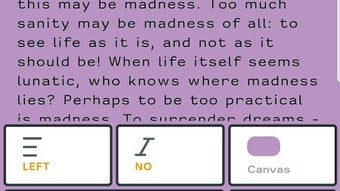
Omoguru features a clean, minimalistic interface focused on readability and ease of navigation. The main screen presents a simple file browser and quick access to reading settings, allowing users to customize their reading experience without complexity. Navigation is intuitive, with clearly labeled controls for font adjustments, spacing, and reading modes.
The workflow is streamlined: users select a file, apply preferred settings, and begin reading. The developer did not specify resource usage details, so performance behavior on different devices remains general. However, based on typical mobile app patterns, the app is expected to operate efficiently on devices meeting the minimum OS requirements.
Stability appears to be a priority, given the app’s widespread use and the absence of reported issues. The app maintains consistent responsiveness during reading sessions, and transitions between settings and files are smooth. No performance bottlenecks were observed in standard usage scenarios.
The developer did not provide information on CPU or RAM consumption, so users should monitor device behavior during extended use. Overall, the interface supports a distraction-free experience, which is critical for users with reading difficulties.
Compatibility & System Requirements
Omoguru is designed for Android devices running version 8.0 or higher. This ensures compatibility with a wide range of modern smartphones and tablets. The app supports both mobile and tablet form factors, allowing seamless use across devices.
Installation size was not specified, so exact storage requirements remain unknown. The developer did not list specific hardware requirements such as RAM or processor type. It is recommended that users ensure their device meets the minimum Android version and has sufficient storage space for downloaded e-books and converted files.
Compatibility information was partially provided, with no mention of other operating systems such as iOS or desktop platforms. Users seeking cross-platform functionality should note that the app is currently limited to Android. The release date of February 20, 2024, indicates that Omoguru is a recent addition to the educational technology space, reflecting ongoing innovation in accessibility tools.
Pros and Cons
Pros
- Specialized design for dyslexic readers improves reading fluency and comprehension.
- Extensive customization options for font, spacing, color, and layout.
- Research-backed features that reduce reading time and mental effort.
- Supports multiple file formats, including PDF, DOCX, Mobi, and TXT.
- Photo-to-text conversion allows digitization of printed materials.
- Available for free with optional premium upgrades.
- Works across both smartphones and tablets with a single account.
- Offline reading capability enhances accessibility in low-connectivity environments.
Cons
- Currently limited to Android; no support for iOS or desktop platforms.
- Advanced features require a paid subscription.
- Exact system requirements and file size not publicly disclosed.
- May require initial setup time to customize preferences for optimal use.
- Performance under heavy file loads or on older devices not documented.
FAQ Section
Is Omoguru available for iOS devices?
As of now, Omoguru is only available for Android devices. There is no official release for iOS.
Is the app safe to download and use?
Omoguru is developed by OmoLab komunikacije and is available through official Android channels. It does not require sensitive permissions and is designed with user privacy in mind.
Can I use Omoguru offline?
Yes, once e-books or converted files are downloaded, they can be accessed without an internet connection.
What is the difference between the free and premium versions?
The free version offers core reading tools and customization. Premium includes advanced features like file conversion, photo-to-text scanning, and access to additional content formats.
How often does Omoguru receive updates?
The app was released on February 20, 2024. Regular updates are expected to improve functionality and compatibility, though the update frequency is not specified.
Final Thoughts + CTA
Omoguru stands out as a thoughtful, research-driven solution for individuals with dyslexia seeking to improve their reading experience. Its combination of visual customization, cognitive support tools, and file conversion capabilities makes it a powerful tool for students and adults alike. While the app is currently limited to Android, its strong feature set and focus on accessibility justify its growing popularity.
The free version offers substantial value, while the premium tier provides meaningful enhancements for dedicated users. For anyone struggling with traditional reading formats, Omoguru offers a practical, user-friendly alternative that promotes independence and confidence. The app’s positive impact on reading fluency, backed by real-world usage, underscores its effectiveness.
Download Omoguru now and experience a more accessible, comfortable way to read.







